Jev and BigQuery AI functions, from one row to ten million
Part 2 of 3 · Typed AI in BigQuery
On this page
In my last post, I connected Jev to BigQuery through Cloud Run and turned support tickets into queryable columns. I also promised a followup on how Jev compares with BigQuery’s own AI functions. Many of you actually asked for this — thank you for the requests!
The comparison felt natural because Jev’s typed questions align very closely with BigQuery’s AI functions. Jev’s Noul returns the probability that something is true, a lot like BigQuery’s AI.IF. Jev’s Choice picks from categories that you define, just like AI.CLASSIFY.
So I ran them side-by-side on public datasets, from a single row to ten million to learn what changed as the data grew.
These are my personal experiments on public datasets. They are not official Google benchmarks.
One task, three ways
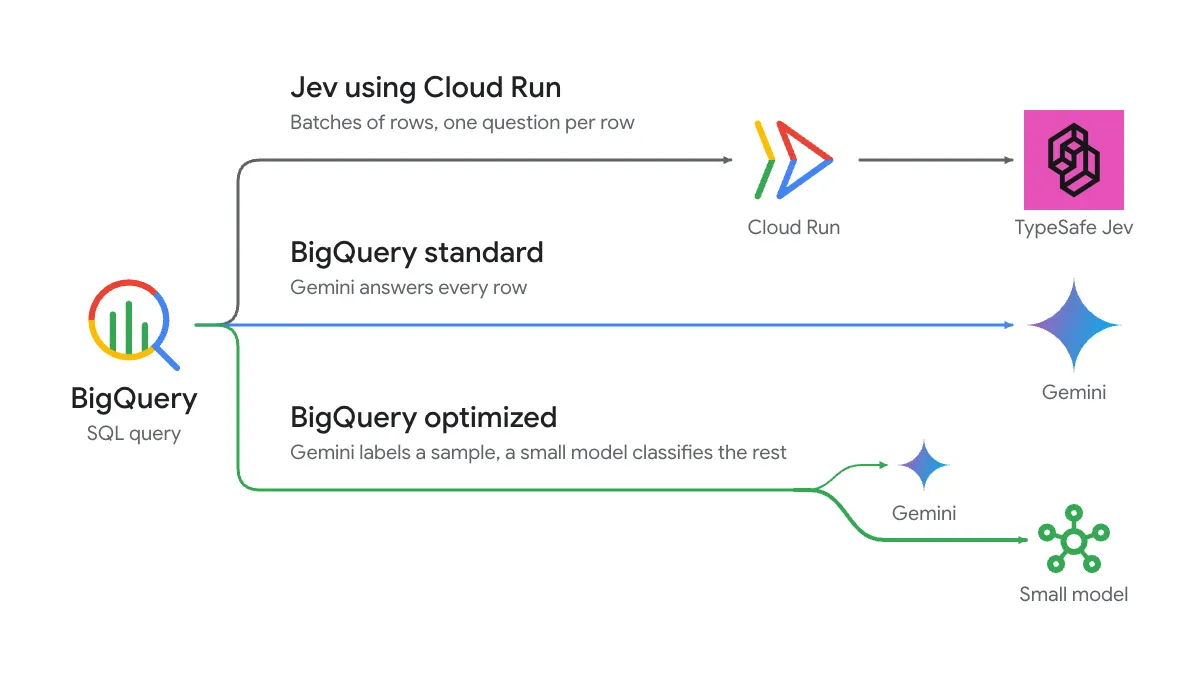
Each approach answers the same question using SQL, but calls a model in a different way:
- Jev using Cloud Run: BigQuery sends batches of rows to a remote function. Cloud Run asks Jev one question per row
- BigQuery standard (
MAXIMIZE_QUALITY): Gemini classifies every row - BigQuery optimized (
MINIMIZE_COST): Gemini labels a sample of rows, then BigQuery trains a small model on embeddings to classify the rest
Here’s what that looks like for classifying news topics. For Jev, it’s a single function call. The function follows the setup from my last post, with an adapter that asks a Choice question for each article:
SELECT row_id, reference, ag_news.classify_news(text) AS result
FROM ag_news.test_articles;
On the BigQuery side, AI.CLASSIFY takes the prompt and categories right in the query. Optimized mode also needs embeddings, which I generated once and reused:
CREATE TABLE ag_news.test_embeddings AS
SELECT *, AI.EMBED(text, endpoint => 'text-embedding-005',
 task_type => 'CLASSIFICATION') AS embedding
FROM ag_news.test_articles;
Then the classification itself:
SELECT row_id, reference,
 AI.CLASSIFY(('Classify the main topic of this news article into exactly one category.', text),
  categories => [
    ('World', 'World news, politics, international affairs, and general current events.'),
    ('Sports', 'Sports, athletes, teams, competitions, and sporting events.'),
    ('Business', 'Business, finance, markets, companies, and the economy.'),
    ('Sci/Tech', 'Science, technology, computing, research, and discoveries.')
  ],
  optimization_mode => 'MINIMIZE_COST',
  embeddings => embedding.result) AS predicted
FROM ag_news.test_embeddings;
Standard mode is the same AI.CLASSIFY call with optimization_mode => 'MAXIMIZE_QUALITY' and no embeddings required.
The small model behind optimized mode is what makes it so interesting. BigQuery trains it on the fly while the query runs, checks it against Gemini’s answers before using it, and can still send individual rows back to Gemini when needed.
How I tested
- Two tasks: movie review sentiment from the public
bigquery-public-data.imdb.reviewstable (Noul vs.AI.IF), and four news topics from AG News (Choice vs.AI.CLASSIFY). All three paths got the same prompt and categories. - Quality on test sets, scale on everything else: I measured accuracy on each dataset’s official test split (25,000 reviews and 7,600 articles). Larger runs, later in this post, used the training data.
- Whole query timings: each time covers the full BigQuery query, including saving results to a table. For Jev, that includes the hops through the remote function and Cloud Run.
How close were the answers?
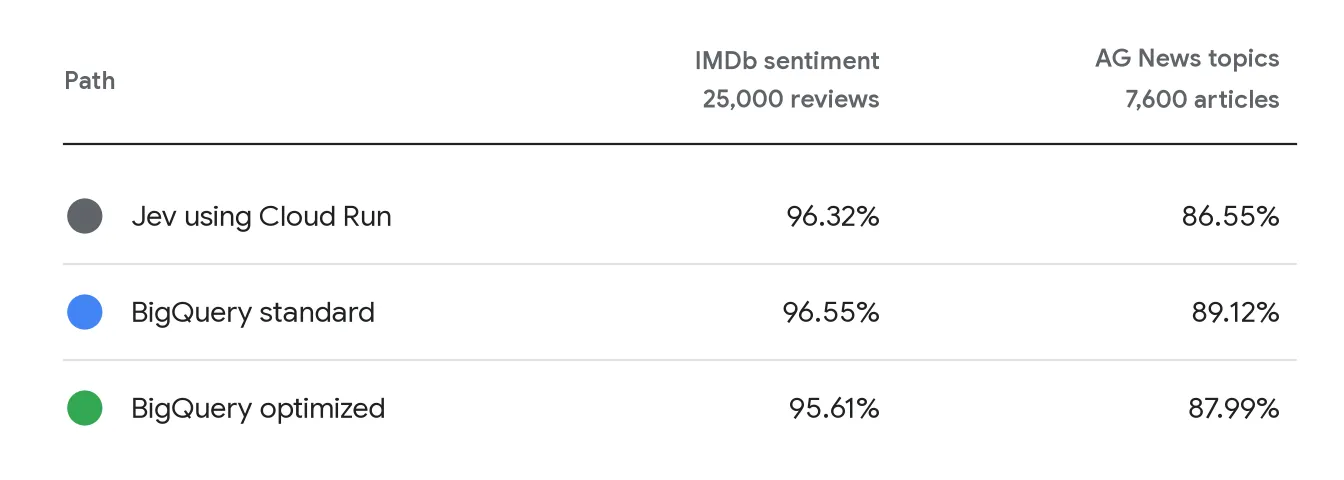
On movie review sentiment, all three paths scored within a point of each other. News topics were more mixed: standard mode came out 2.6 points ahead of Jev, and most of that gap came from articles about tech companies (Jev filed about a quarter of them under Business instead of Sci/Tech). But many of these articles could go either way, so it’s worth checking where models disagree too — not just how often they’re right.
As the rows grew
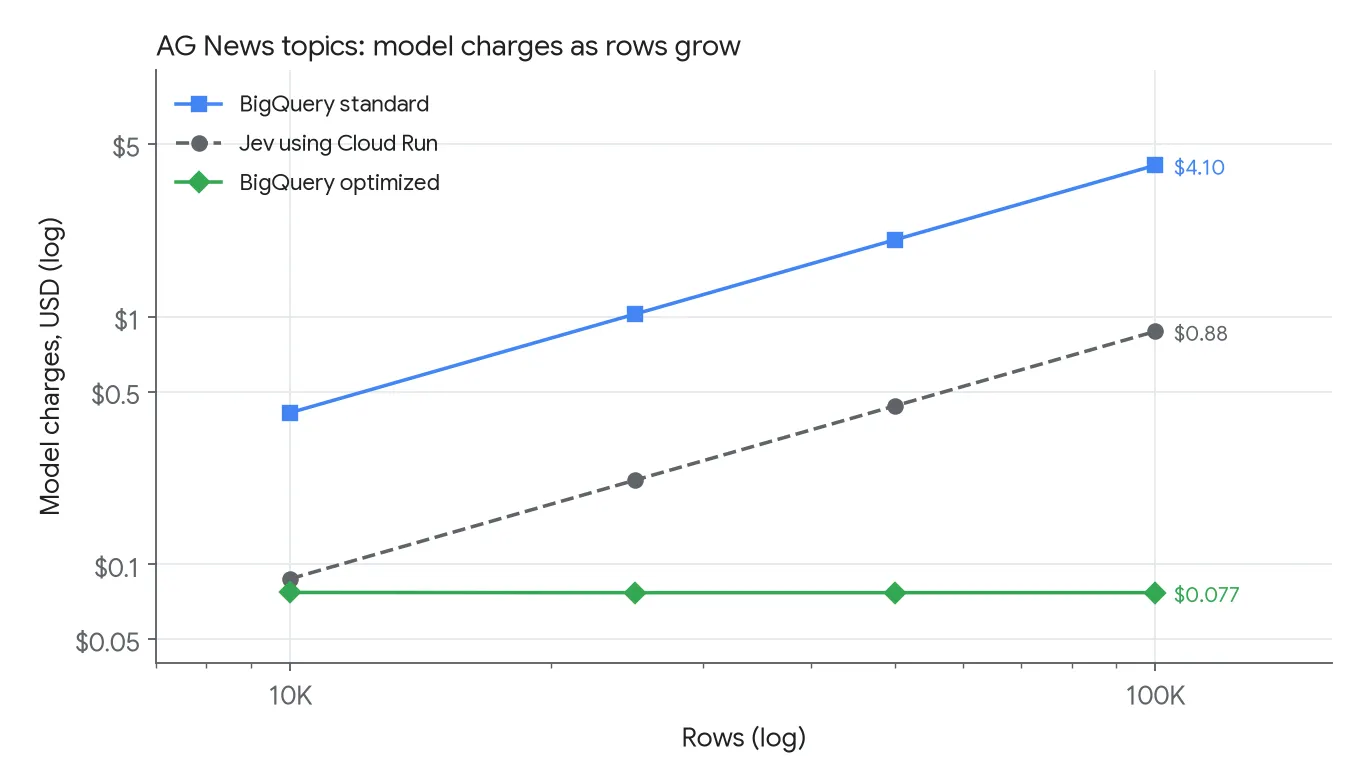
As the data grew, the three paths diverged. Standard mode’s time and charges climb with every row: $0.41 for 10,000 AG News articles, and $4.10 for 100,000. Jev’s charges grew too — but at published pricing, my usage estimate comes to $0.88 for 100,000 articles.
Optimized mode barely budged. It cost about $0.077 per run whether I gave it 7,600 articles or 100,000, and its median time stayed under a minute. That’s by design: only 1,850 articles went through Gemini at every size, and the trained model handled the rest.
Speed told a different story, especially for small queries. Jev scored 1 to 1,000 reviews in just 1.5 to 2.5 seconds. On the 25,000 test reviews, it finished in 19 seconds, compared with 65 seconds for optimized and 152 seconds for standard.
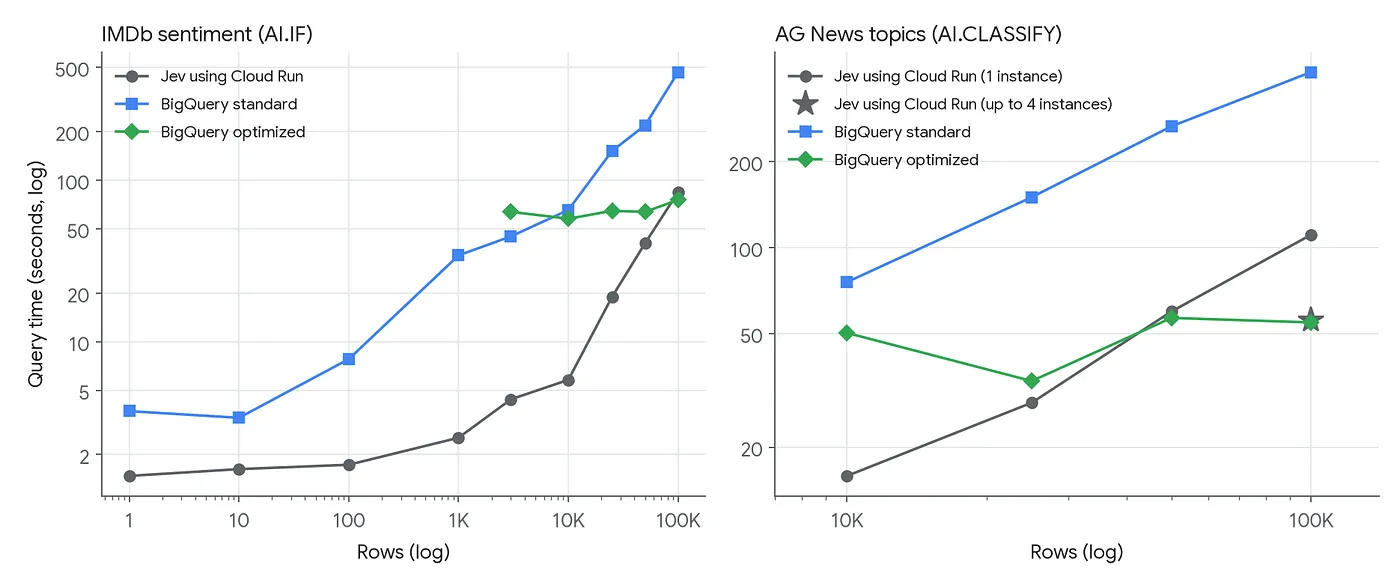
Jev’s line climbs as row count increases because each row still needs a model call and its speed depends on how many calls run at once. I initially limited Cloud Run to a single instance handling four requests at a time. When I allowed up to four instances (each with four requests), the 100,000-article run took 56 seconds instead of 111 (the star in the AG News chart), right alongside optimized mode. That run was already starting to hit Jev’s rate limits, though, so there’s a ceiling to how far this goes.
Going to ten million rows
I wanted to see how far BigQuery’s optimized flat cost line would go, so I gave it the public dataset bigquery-public-data.stackoverflow. I sampled ten million questions across eight programming languages and asked BigQuery to classify each question using the title and first 500 characters of its body. Here, “accuracy” means agreeing with the language tag the asker chose.
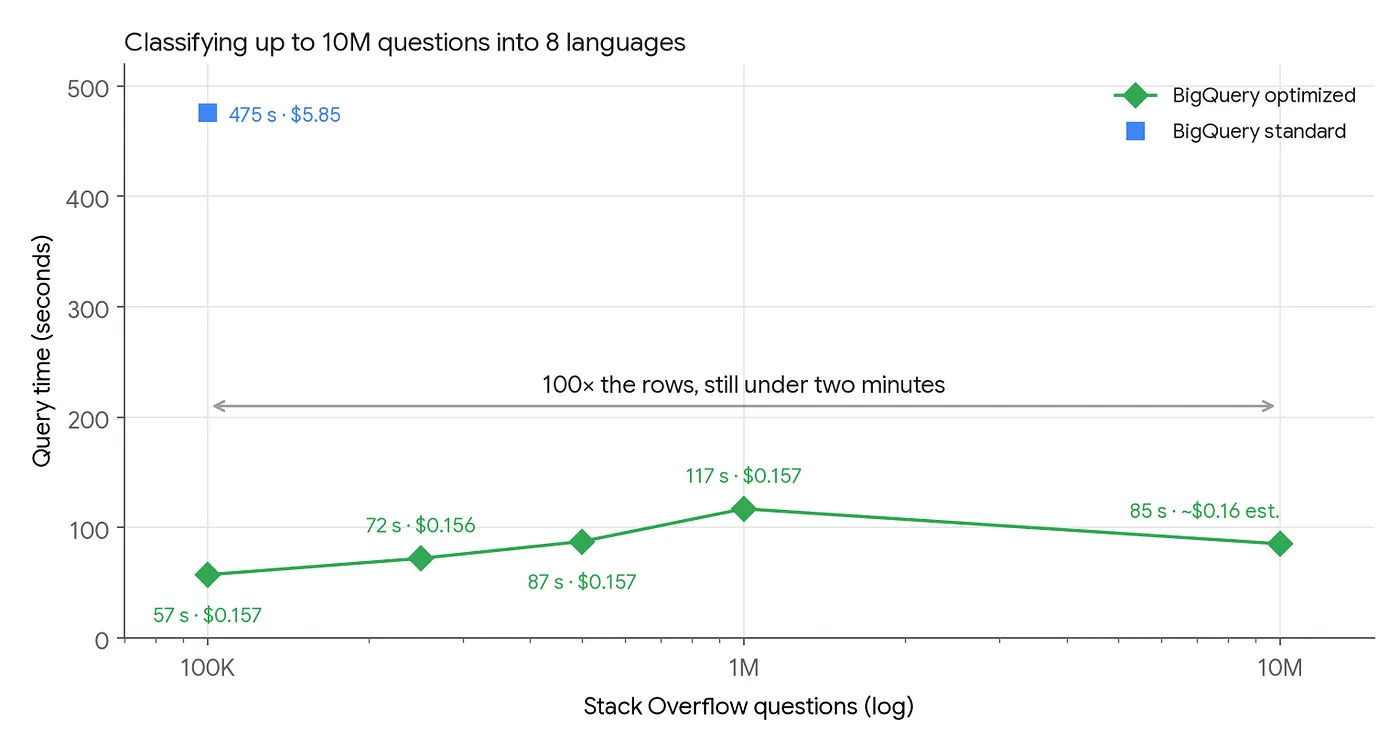
A hundred times the rows still finished in under two minutes, and classification cost about the same at every size. Times varied a bit from run-to-run, but the line remained relatively flat. Agreement with the language tags held steady at about 94% (standard mode: 95.3% at 100,000).
The bigger line item was generating embeddings: about an hour and $87 for ten million questions. For comparison, standard mode cost $5.85 for 100,000 questions or roughly $585 for ten million. Jev would cost about $155 for the same questions at today’s price. With optimized mode, you only pay for embeddings once — asking the same table a new question costs about $0.16. Some tables even come with embedding columns (like the public IMDb table I used earlier).
Jev + AI functions together
Here’s an idea I couldn’t resist trying. What if a fast, inexpensive model takes the first pass, and only the rows it’s unsure about go to a bigger, pricier one? This pattern is often called a model cascade. Jev returns a confidence score (0 to 1) with each Choice answer, so I split the table with a simple WHERE clause. I kept Jev’s answer when its confidence was at least 0.80 (a cutoff I picked on training data earlier) and sent everything else to standard AI.CLASSIFY:
CREATE TABLE ag_news.cascade_standard AS
SELECT s.row_id, s.reference,
 AI.CLASSIFY(('Classify the main topic of this news article into exactly one category.', s.text),
  categories => [
    ('World', 'World news, politics, international affairs, and general current events.'),
    ('Sports', 'Sports, athletes, teams, competitions, and sporting events.'),
    ('Business', 'Business, finance, markets, companies, and the economy.'),
    ('Sci/Tech', 'Science, technology, computing, research, and discoveries.')
  ],
  optimization_mode => 'MAXIMIZE_QUALITY') AS predicted
FROM ag_news.test_articles s
JOIN ag_news.jev_results j USING (row_id)
WHERE CAST(JSON_VALUE(j.result, '$.confidence') AS FLOAT64) < 0.80;
Of the 7,600 test articles, only 14% fell under the 0.80 cutoff, and the combined answers matched standard’s accuracy exactly (89.12%) for $0.11 in total model charges instead of $0.31 for standard alone. At 100,000 articles, 13.5% went to standard: 88.99% accuracy (vs. 89.09%) for $1.43 instead of $4.10, in 172 seconds compared with a 413-second median for standard alone.
What surprised me
- The cost curves have different shapes by design. Paths that call a model on every row grow with every row. Optimized mode pays mostly up front for embeddings, then barely grows: its classification charge stayed about the same from 100,000 rows to ten million. How many rows you have, and how often you rerun, matters more than anything else.
- You don’t have to pick just one. In a model cascade, Jev answered the rows it was confident about and sent the rest (~14%) to Gemini. The combined answers matched the standard mode’s accuracy for about a third of the charges.
- Deployment settings mattered as much as the model. One Cloud Run setting cut Jev’s time in half. Batch size mattered too: my first 100-review batches blew past Jev’s token limit, so I dropped to 50.
- The quality gap depends on the task. Sentiment was nearly a tie, while topics differed by 2.6 points, mostly from one fuzzy boundary.
- Standard mode was repeatable. Rerunning standard mode gave identical answers for each row, which is handy when you need reproducible results. Optimized mode and Jev’s answers shifted by a few percent between runs.
Try it yourself
These are public datasets — each with its own quirks. Your categories, text lengths and volumes will behave differently, so the right tool for your data might not be the one that looked best in this experiment. Before you commit to a path, try it on a sample of your own data. Compare the answers with labels you trust, investigate where they disagree, and watch how time and charges change as you scale up.
The GitHub repo from my last post has the Cloud Run service and setup guide to get started. You can also learn more about AI.IF and AI.CLASSIFY in the BigQuery documentation.
What would you want from AI functions in SQL? Let me know!
Update: In the next post, I rerun these benchmarks with Google’s Gemini Decisions API and test multi-question PDF evaluation.